> ## Documentation Index
> Fetch the complete documentation index at: https://docs.revoengine.com/llms.txt
> Use this file to discover all available pages before exploring further.
# Events
> Trigger [Jobs](/solutions/jobs) using real time events effortlessly.
The Events feature on our platform is ingeniously designed to operate in real time upon certain events.
It provides the flexibility to trigger Jobs where user can design it to work with various business needs.
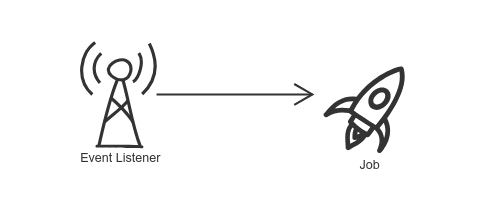 Our event listener is listening to all events for your instance.
When event occur we looking for all configured events for it's type and optionally **filters**.
We execute bounded [Jobs](/solutions/jobs) to all applicable events.
# Configuration
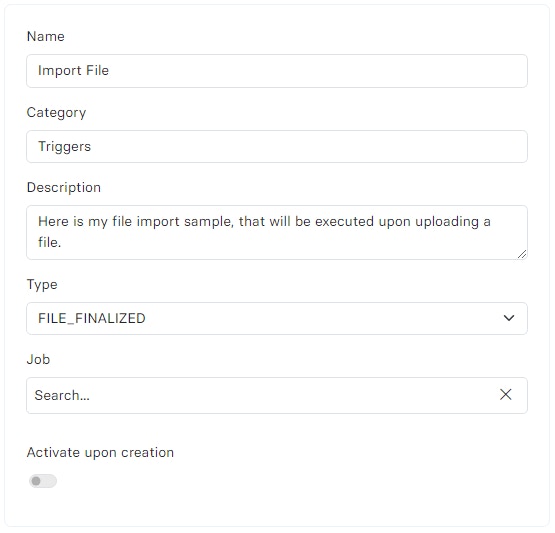
You can configure as many events for the same type as you want, you can also use **filters** for predefined events to execute only upon certain action.
* `Type` - You need to select the **type** (from a list below) or create your own **Custom Event** which can be invoked directly in your [Component](/components).
* `Job` - Select [Job](/solutions/jobs) that will be executed upon trigger.
Our event listener is listening to all events for your instance.
When event occur we looking for all configured events for it's type and optionally **filters**.
We execute bounded [Jobs](/solutions/jobs) to all applicable events.
# Configuration
You can configure as many events for the same type as you want, you can also use **filters** for predefined events to execute only upon certain action.
* `Type` - You need to select the **type** (from a list below) or create your own **Custom Event** which can be invoked directly in your [Component](/components).
* `Job` - Select [Job](/solutions/jobs) that will be executed upon trigger.
 # Types
The Events feature on our platform is designed to respond in real-time to various predefined or custom events. This dynamic functionality enables users to trigger Jobs tailored to specific occurrences within the platform, enhancing operational responsiveness and efficiency. This list is **constantly evolving**.
| Event Type | Description |
| ---------------------------- | ------------------------------------------------------------------------------------------------------------------------------------------------------------------------------------------------------- |
| `FILE_FINALIZED` | Triggered upon successful file upload. |
| `FILE_ARCHIVED` | Triggered when a file is archived or soft deleted. |
| `FILE_DELETED` | Triggered when a file is permanently deleted. |
| `SERVICE_ACCOUNT_CREATE` | Triggered upon the creation of a service account. |
| `SERVICE_ACCOUNT_ACTIVATE` | Triggered when a service account is activated. |
| `SERVICE_ACCOUNT_DEACTIVATE` | Triggered when a service account is deactivated. |
| `SERVICE_ACCOUNT_RESTORED` | Triggered when a service account is restored. |
| `SERVICE_ACCOUNT_DELETED` | Triggered when a service account is deleted. |
| `USER_CREATE` | Triggered upon creating a user. |
| `USER_UPDATE` | Triggered when a user's details are updated. |
| `USER_ACTIVATE` | Triggered when a user is activated. |
| `USER_DEACTIVATE` | Triggered when a user is deactivated. |
| `USER_RESTORED` | Triggered when a user is restored. |
| `USER_DELETED` | Triggered when a user is deleted. |
| `ACCOUNT_API_KEY_CREATE` | Triggered upon the creation of an API key for the account. |
| `ACCOUNT_API_KEY_UPDATE` | Triggered when an account's API key is updated. |
| `ACCOUNT_API_KEY_DELETED` | Triggered when an account's API key is deleted. |
| `SERVICE_ACCOUNT_UPDATE` | Triggered when a service account's details are updated. |
| `CUSTOM_{EVENT_TYPE}` | Triggered upon custom trigger `EVENT_TYPE`. Custom Events always starts from `CUSTOM_` prefix, you must additionally specify the name e.g. `CURRENCY`, which give you `CUSTOM_CURRENCY`. |
# State
* `Active` - Currently operates and will execute the Jobs.
* `Disabled` - Disabled listener that can be activated or deleted.
* `Deleted` - Listener has been removed but can be reverted.
# Examples
* **Automated Data Processing** - Triggering Jobs to process data upon file uploads or updates e.g. CSV data processing, OCR file reader and many more.
* **Notification Systems** - Executing Jobs that send notifications or alerts in response to specific account activities or system changes.
* **Workflow Automation** - Creating Custom Events to automate complex workflows, such as financial transactions, sales, distributions, security audits and more, flagged by **`CUSTOM`** events.
* **Trigger Webhooks** - Assuming that you already fetched some data and would like to send it to external systems e.g. currency list for an ERP system.
* **Key Rotations** - You can send API’s keys or update external systems with the new keys upon some automation processes.
And many more **Unlimited** possibilities.
# Types
The Events feature on our platform is designed to respond in real-time to various predefined or custom events. This dynamic functionality enables users to trigger Jobs tailored to specific occurrences within the platform, enhancing operational responsiveness and efficiency. This list is **constantly evolving**.
| Event Type | Description |
| ---------------------------- | ------------------------------------------------------------------------------------------------------------------------------------------------------------------------------------------------------- |
| `FILE_FINALIZED` | Triggered upon successful file upload. |
| `FILE_ARCHIVED` | Triggered when a file is archived or soft deleted. |
| `FILE_DELETED` | Triggered when a file is permanently deleted. |
| `SERVICE_ACCOUNT_CREATE` | Triggered upon the creation of a service account. |
| `SERVICE_ACCOUNT_ACTIVATE` | Triggered when a service account is activated. |
| `SERVICE_ACCOUNT_DEACTIVATE` | Triggered when a service account is deactivated. |
| `SERVICE_ACCOUNT_RESTORED` | Triggered when a service account is restored. |
| `SERVICE_ACCOUNT_DELETED` | Triggered when a service account is deleted. |
| `USER_CREATE` | Triggered upon creating a user. |
| `USER_UPDATE` | Triggered when a user's details are updated. |
| `USER_ACTIVATE` | Triggered when a user is activated. |
| `USER_DEACTIVATE` | Triggered when a user is deactivated. |
| `USER_RESTORED` | Triggered when a user is restored. |
| `USER_DELETED` | Triggered when a user is deleted. |
| `ACCOUNT_API_KEY_CREATE` | Triggered upon the creation of an API key for the account. |
| `ACCOUNT_API_KEY_UPDATE` | Triggered when an account's API key is updated. |
| `ACCOUNT_API_KEY_DELETED` | Triggered when an account's API key is deleted. |
| `SERVICE_ACCOUNT_UPDATE` | Triggered when a service account's details are updated. |
| `CUSTOM_{EVENT_TYPE}` | Triggered upon custom trigger `EVENT_TYPE`. Custom Events always starts from `CUSTOM_` prefix, you must additionally specify the name e.g. `CURRENCY`, which give you `CUSTOM_CURRENCY`. |
# State
* `Active` - Currently operates and will execute the Jobs.
* `Disabled` - Disabled listener that can be activated or deleted.
* `Deleted` - Listener has been removed but can be reverted.
# Examples
* **Automated Data Processing** - Triggering Jobs to process data upon file uploads or updates e.g. CSV data processing, OCR file reader and many more.
* **Notification Systems** - Executing Jobs that send notifications or alerts in response to specific account activities or system changes.
* **Workflow Automation** - Creating Custom Events to automate complex workflows, such as financial transactions, sales, distributions, security audits and more, flagged by **`CUSTOM`** events.
* **Trigger Webhooks** - Assuming that you already fetched some data and would like to send it to external systems e.g. currency list for an ERP system.
* **Key Rotations** - You can send API’s keys or update external systems with the new keys upon some automation processes.
And many more **Unlimited** possibilities.