> ## Documentation Index
> Fetch the complete documentation index at: https://docs.revoengine.com/llms.txt
> Use this file to discover all available pages before exploring further.
# Schedule
> Trigger [Jobs](/solutions/jobs) using cron-like scheduler effortlessly.
The Schedule feature on our platform is ingeniously designed to operate like a sophisticated cronjob system.
It provides the flexibility to trigger Jobs at predetermined intervals, catering to various business needs
with precision and efficiency.
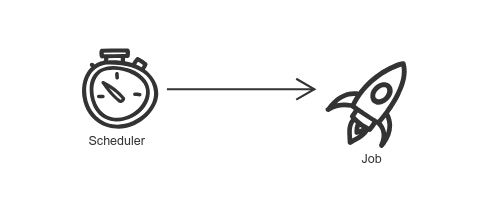 You deploy your own Schedule with `cron-like` syntax.
Once the criteria are met for given `cron`, schedule is executed.
We execute bounded [Job](solutions/jobs) to schedule.
# Configuration
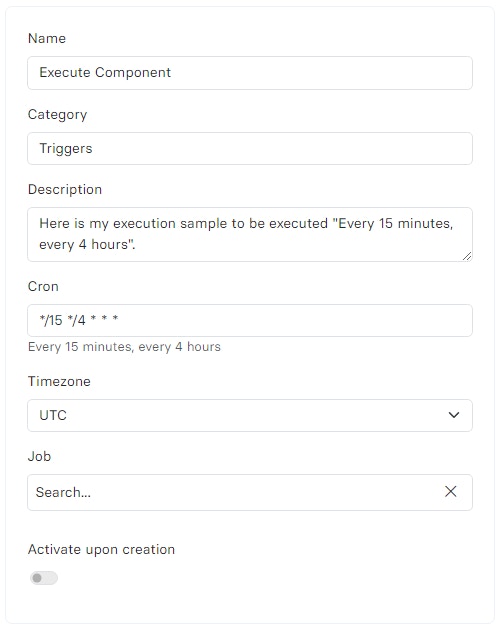
* `Cron` - Scheduler expression in [unix-cron](https://man7.org/linux/man-pages/man5/crontab.5.html) format (a minimum interval of `one minute` can be set).
If you are not sure about cron format, use our [AI Assistant](features/ai-assistant) to help you out with it and look under provided cron weather it fits your configuration.
* `Timezone`- Location of the execution using [tz database](https://en.wikipedia.org/wiki/List_of_tz_database_time_zones) identifier, e.g. Europe/Berlin which corresponds to UTC+1.
In certain time zones, the implementation of daylight saving time may lead to unpredicted occurrences or
omissions of job executions. This happens because Schedule operates based on standard time. During periods
when the time is set back and a particular hour repeats, jobs scheduled at these hours may experience irregularities
in their execution. For jobs necessitating precise timing, selecting a time zone exempt from daylight saving time
adjustments is advisable. For this purpose, using `UTC` is a preferable option to entirely circumvent these issues.
* `Job` - Select [Job](/solutions/jobs) that should be executed upon trigger.
You deploy your own Schedule with `cron-like` syntax.
Once the criteria are met for given `cron`, schedule is executed.
We execute bounded [Job](solutions/jobs) to schedule.
# Configuration
* `Cron` - Scheduler expression in [unix-cron](https://man7.org/linux/man-pages/man5/crontab.5.html) format (a minimum interval of `one minute` can be set).
If you are not sure about cron format, use our [AI Assistant](features/ai-assistant) to help you out with it and look under provided cron weather it fits your configuration.
* `Timezone`- Location of the execution using [tz database](https://en.wikipedia.org/wiki/List_of_tz_database_time_zones) identifier, e.g. Europe/Berlin which corresponds to UTC+1.
In certain time zones, the implementation of daylight saving time may lead to unpredicted occurrences or
omissions of job executions. This happens because Schedule operates based on standard time. During periods
when the time is set back and a particular hour repeats, jobs scheduled at these hours may experience irregularities
in their execution. For jobs necessitating precise timing, selecting a time zone exempt from daylight saving time
adjustments is advisable. For this purpose, using `UTC` is a preferable option to entirely circumvent these issues.
* `Job` - Select [Job](/solutions/jobs) that should be executed upon trigger.
 # State
* `Active` - Currently operates and will execute the Jobs.
* `Disabled` - Disabled scheduler that can be activated or deleted.
* `Deleted` - Schedule has been removed but can be reverted.
# Examples
* **Regular Data Processing** - Automating data transformation or analysis Jobs to run at specific times.
* **System Maintenance Tasks** - Scheduling regular maintenance Jobs like database backups or system updates.
* **Time-sensitive Operations** - Executing Jobs that are critical to be run at particular times of the day, aligning with business hours or specific events.
# State
* `Active` - Currently operates and will execute the Jobs.
* `Disabled` - Disabled scheduler that can be activated or deleted.
* `Deleted` - Schedule has been removed but can be reverted.
# Examples
* **Regular Data Processing** - Automating data transformation or analysis Jobs to run at specific times.
* **System Maintenance Tasks** - Scheduling regular maintenance Jobs like database backups or system updates.
* **Time-sensitive Operations** - Executing Jobs that are critical to be run at particular times of the day, aligning with business hours or specific events.