> ## Documentation Index
> Fetch the complete documentation index at: https://docs.revoengine.com/llms.txt
> Use this file to discover all available pages before exploring further.
# Run API - Configuration
> Here you can read about configuration of [Endpoints](/endpoints) (Run API) in details.
# Details
Besides the [common properties](/features/search) like `name`, `category`, `description`, you can configure these properties.
| Property | Required | Description |
| ------------------- | -------- | ---------------------------------------------------------------------------------------------------------------------------------------------------------------------------------------------------------------------------------------------------------------------------------------------------------------------------------------------------------------------------------------------------------------------------------------------------------------------------------------------------------------------------------------------- |
| `Method` | Yes | Can be one of following: `GET`, `POST`, `PUT`, `PATCH`, `DELETE` |
| `Path` | Yes | Configure path of endpoint, must start from `/` accepts: lowercase `a-z`, upper case `A-Z`, numbers `0-9` as well as `/` and `-`, for dynamic parameters use `@`. `@` are used to map dynamically values added to your paths that can be accessible in your **Components**, when you want to map dynamically you would use typically `/v1/users/{userId}`, in RevoEngine you would do following `/v1/users/@`. Our [Routing](/run-api/routing) mechanism is quite advance to support multiple edge cases, please read it carefully. |
| `Component` | No | You can select [Component](/components) that will be executed upon request. |
| `Component Version` | No | You can select specific version of [Component](/components), default: `LATEST`. |
# Options
| Property | Required | Description |
| ---------------- | -------- | ----------------------------------------------------------------------------------------------------------------------------------------------------------------------------------------- |
| `Schema` | No | You can select [Guard](/run-api/guard) that will be used for validating request. |
| `Schema Version` | No | You can select specific version of [Guard](/run-api/guard), default: `LATEST`. |
| `Skip Libs` | No | Whether the compiler should ignore [Component Libraries](/components/library) during compilation. |
| `Legacy Results` | No | Whether the compiler should always return `200` status code together with full details about `trace`, `logs`, `errors`, `warnings` and other properties that are shown for [Jobs](/jobs). |
| `Hide Request` | No | Whether the platform should not log entire request payload, default `false`. |
| `Hide Response` | No | Whether the platform should not log entire response, default `false`. |
# Input
### `customValidateResponse`
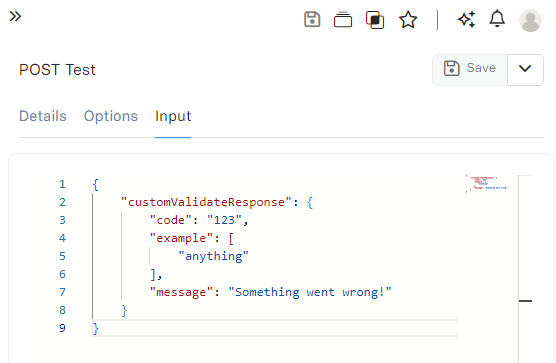
You can specify response body, however, there are some built-in properties that are added to response (but you can override it).
* `statusCode` is hardcoded based on returned *HTTP Code*.
* `timestamp` is generated upon sending response (server time).
Example configuration:
 ```json theme={null}
{
"statusCode": 400,
"timestamp": "2024-05-08T10:52:32.955Z",
"code": "123",
"example": [
"anything"
],
"message": "Something went wrong!"
}
```
### `extra`
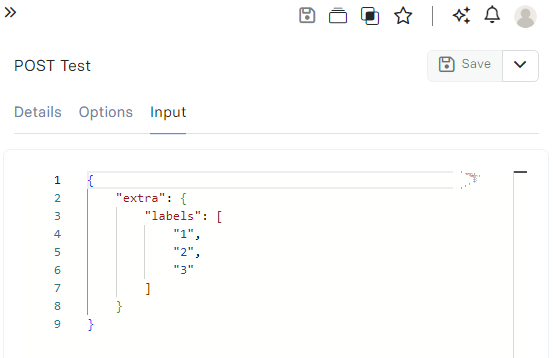
Additional parameter that you can pass to your component can be "any" type of data.
This is useful especially when you want to configure static guards, static params or in case of using the
same component by multiple `Endpoints` or even `Jobs` and distinguish them that way accessible
with `api.input().templateInputs.extra` or any other configurable action.
Example configuration:
```json theme={null}
{
"statusCode": 400,
"timestamp": "2024-05-08T10:52:32.955Z",
"code": "123",
"example": [
"anything"
],
"message": "Something went wrong!"
}
```
### `extra`
Additional parameter that you can pass to your component can be "any" type of data.
This is useful especially when you want to configure static guards, static params or in case of using the
same component by multiple `Endpoints` or even `Jobs` and distinguish them that way accessible
with `api.input().templateInputs.extra` or any other configurable action.
Example configuration:
 ```javascript theme={null}
return api.input().templateInputs.extra;
// Returns
{
"labels": [
"1",
"2",
"3"
]
}
```
### `httpCode`
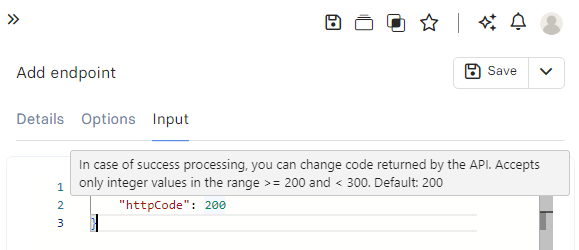
In case of success response, we allow users to configure their success HTTP code in range of 200-299 ([successful responses](https://developer.mozilla.org/en-US/docs/Web/HTTP/Status#successful_responses)).
Example configuration:
```javascript theme={null}
return api.input().templateInputs.extra;
// Returns
{
"labels": [
"1",
"2",
"3"
]
}
```
### `httpCode`
In case of success response, we allow users to configure their success HTTP code in range of 200-299 ([successful responses](https://developer.mozilla.org/en-US/docs/Web/HTTP/Status#successful_responses)).
Example configuration:
 ### `noResult`
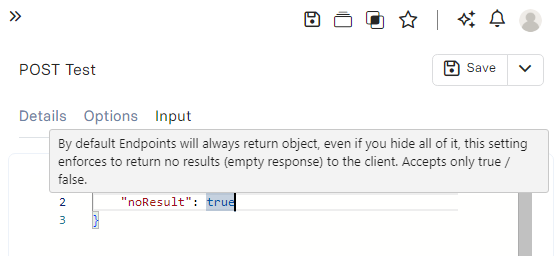
By default, Endpoints will always return an object, even if you hide all of it, this setting enforces to return no results (empty response) to the client. Accepts only `true` / `false`.
Example configuration:
### `noResult`
By default, Endpoints will always return an object, even if you hide all of it, this setting enforces to return no results (empty response) to the client. Accepts only `true` / `false`.
Example configuration:
 Example response:
 ### `popResult`
By default, **Endpoints** are processing all component elements and return their values, so the response is always as an object. However, you can configure to return a single element only regardless of their configuration like "hide". Useful when you would like to return a different format of data (not object which is default) or only single element out of dozens of others, without a need of hiding others. Accepts only string value and must be identical as a `Component` element name.
Example configuration:
### `popResult`
By default, **Endpoints** are processing all component elements and return their values, so the response is always as an object. However, you can configure to return a single element only regardless of their configuration like "hide". Useful when you would like to return a different format of data (not object which is default) or only single element out of dozens of others, without a need of hiding others. Accepts only string value and must be identical as a `Component` element name.
Example configuration:
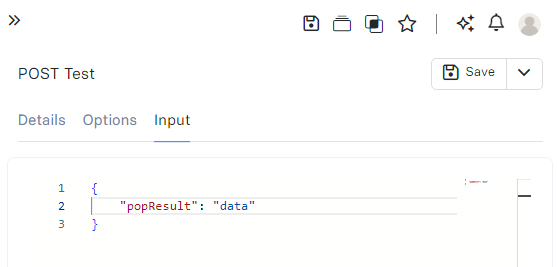 Responses:
```json With popResult on "data" theme={null}
[
"Example #0",
"Example #1",
"Example #2",
"Example #3",
"Example #4"
]
```
```json Without popResult theme={null}
{
"data": [
"Example #0",
"Example #1",
"Example #2",
"Example #3",
"Example #4"
],
"nothidden": [
"Example #0",
"Example #1",
"Example #2",
"Example #3",
"Example #4"
]
}
```
### `response`
In case the component is not bound to Endpoint, you can specify a response which can be "any" type of data.
This can be used for mocking endpoints that don't have a full implementation yet or to handle static configurations.
When **Component** is set, and `response`is also configured, it will always prioritize **Component** execution.
When **Component** is not set, and `response` is not configured, Endpoint is considered in `Invalid` state!
```json theme={null}
{
"statusCode": 502,
"timestamp": "2024-05-08T12:29:46.949Z",
"message": "Endpoint \"POST /test\" is not configured properly, verify your configuration."
}
```
Example configuration:
Responses:
```json With popResult on "data" theme={null}
[
"Example #0",
"Example #1",
"Example #2",
"Example #3",
"Example #4"
]
```
```json Without popResult theme={null}
{
"data": [
"Example #0",
"Example #1",
"Example #2",
"Example #3",
"Example #4"
],
"nothidden": [
"Example #0",
"Example #1",
"Example #2",
"Example #3",
"Example #4"
]
}
```
### `response`
In case the component is not bound to Endpoint, you can specify a response which can be "any" type of data.
This can be used for mocking endpoints that don't have a full implementation yet or to handle static configurations.
When **Component** is set, and `response`is also configured, it will always prioritize **Component** execution.
When **Component** is not set, and `response` is not configured, Endpoint is considered in `Invalid` state!
```json theme={null}
{
"statusCode": 502,
"timestamp": "2024-05-08T12:29:46.949Z",
"message": "Endpoint \"POST /test\" is not configured properly, verify your configuration."
}
```
Example configuration:
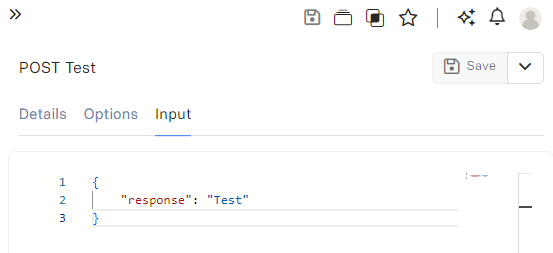 Response:
```json theme={null}
"Test"
```
### `validateHideResponse`
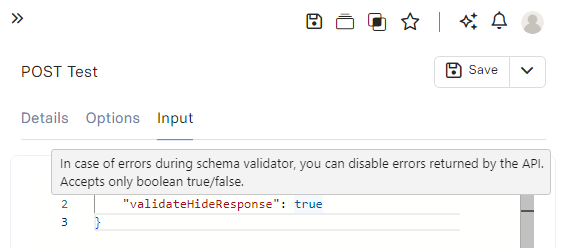
When you would like to hide the default `errors` response of [Guard](/run-api/guard) you should set to `false` default `true`.
Response:
```json theme={null}
"Test"
```
### `validateHideResponse`
When you would like to hide the default `errors` response of [Guard](/run-api/guard) you should set to `false` default `true`.
 ```json false theme={null}
{
"statusCode": 400,
"timestamp": "2024-05-08T10:23:37.821Z",
"message": "Bad Request",
"errors": [
"\"productId\" is required but missing",
"\"price\" is required but missing"
]
}
```
```json true theme={null}
{
"statusCode": 400,
"timestamp": "2024-05-08T10:23:37.821Z",
"message": "Bad Request"
}
```
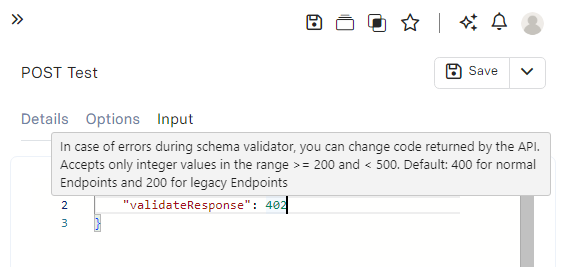
### `validateResponse`
By default, we always return `400` in case request bounce of [Guard](/run-api/guard) validation.
However, you can customize this behaviour by setting on the following status code between (inclusive) `200-499`.
```json false theme={null}
{
"statusCode": 400,
"timestamp": "2024-05-08T10:23:37.821Z",
"message": "Bad Request",
"errors": [
"\"productId\" is required but missing",
"\"price\" is required but missing"
]
}
```
```json true theme={null}
{
"statusCode": 400,
"timestamp": "2024-05-08T10:23:37.821Z",
"message": "Bad Request"
}
```
### `validateResponse`
By default, we always return `400` in case request bounce of [Guard](/run-api/guard) validation.
However, you can customize this behaviour by setting on the following status code between (inclusive) `200-499`.
 ### `excludeLibs`
You can configure the names of specific [Component Libraries](/components/library) that should **not be compiled** into execution.
This might be useful if you have libraries that are still work in progress or used sometimes, by default RevoEngine compiles all libraries into execution context.
If you have some libraries that are `Active` but they cannot compile (e.g. syntax error) you will get `Errors` of compiler (it should not affect execution if this library is not used, but warnings will come to your logs). Ideally they should be excluded with this option.
### `includeLibs`
You can configure the names of specific [Component Libraries](/components/library) that should **be compiled** into execution.
This might be useful if you have hundreds of libraries that won't be used in this execution context to improve the performance of Job execution.
### `excludeLibs`
You can configure the names of specific [Component Libraries](/components/library) that should **not be compiled** into execution.
This might be useful if you have libraries that are still work in progress or used sometimes, by default RevoEngine compiles all libraries into execution context.
If you have some libraries that are `Active` but they cannot compile (e.g. syntax error) you will get `Errors` of compiler (it should not affect execution if this library is not used, but warnings will come to your logs). Ideally they should be excluded with this option.
### `includeLibs`
You can configure the names of specific [Component Libraries](/components/library) that should **be compiled** into execution.
This might be useful if you have hundreds of libraries that won't be used in this execution context to improve the performance of Job execution.