> ## Documentation Index
> Fetch the complete documentation index at: https://docs.revoengine.com/llms.txt
> Use this file to discover all available pages before exploring further.
# Jobs
> Configure and ship your asynchronous Jobs.
Jobs on our platform are a critical feature for orchestrating asynchronous tasks, designed to trigger in real-time
based on various operational events.
They are the cornerstone of automation, capable of responding to a wide range of
triggers such as [Events](/features/events), [Schedule](/features/schedule), direct [Component](/features/components)
executions, as well as manual (via a platform) and more, offering a comprehensive solution for diverse business automation needs.
Similar to [Endpoints](/solutions/endpoints) it executes configured [Component](/features/components).
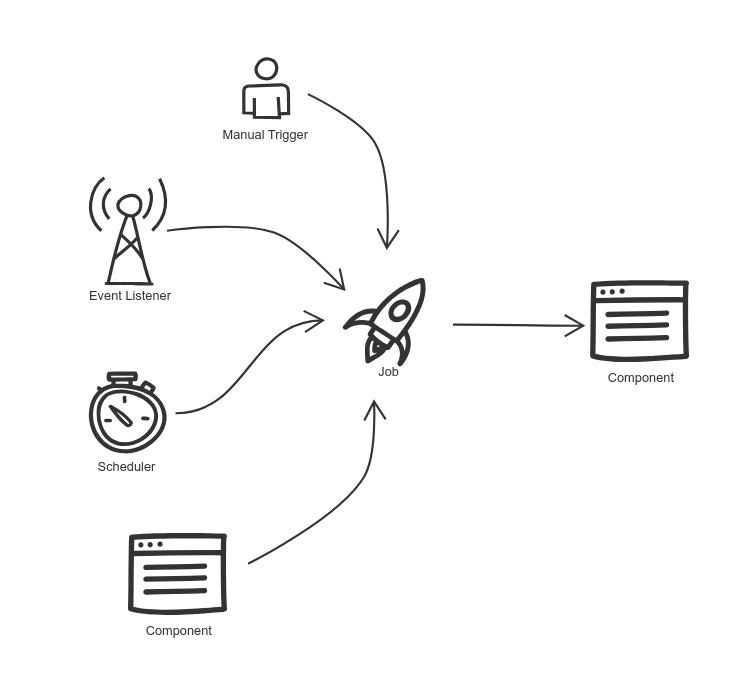 Received a trigger to execute a **Job**: Manual Trigger (via platform or [API request](/api-reference/automation/run-template)), [Event](/features/events), [Schedule](/features/schedule), [Component](/features/components)
Based on given configuration, we are preparing the Job and keep updating it's status upon progress (check statuses).
We constantly monitor and update status of the Job and send [Notifications](/features/notifications).
We track all the details including logs, warnings, errors, results of the Job so you can find it all in a single place.
# Features
## Triggers
* `Events` - set up your event to trigger a job using **real-time** [Events](/features/events).
* `Schedule` - set up your schedule to trigger a job using **cron-like** [Schedule](/features/schedule).
* `API Trigger` - trigger a job via an [API request](/api-reference/automation/run-template).
* `Component` - trigger a job via code with [Component](/features/components) including extra payload or scheduled delivery.
Received a trigger to execute a **Job**: Manual Trigger (via platform or [API request](/api-reference/automation/run-template)), [Event](/features/events), [Schedule](/features/schedule), [Component](/features/components)
Based on given configuration, we are preparing the Job and keep updating it's status upon progress (check statuses).
We constantly monitor and update status of the Job and send [Notifications](/features/notifications).
We track all the details including logs, warnings, errors, results of the Job so you can find it all in a single place.
# Features
## Triggers
* `Events` - set up your event to trigger a job using **real-time** [Events](/features/events).
* `Schedule` - set up your schedule to trigger a job using **cron-like** [Schedule](/features/schedule).
* `API Trigger` - trigger a job via an [API request](/api-reference/automation/run-template).
* `Component` - trigger a job via code with [Component](/features/components) including extra payload or scheduled delivery.
 * `Manual Trigger` - trigger Job execution via a platform.
 ## Retry Mechanism
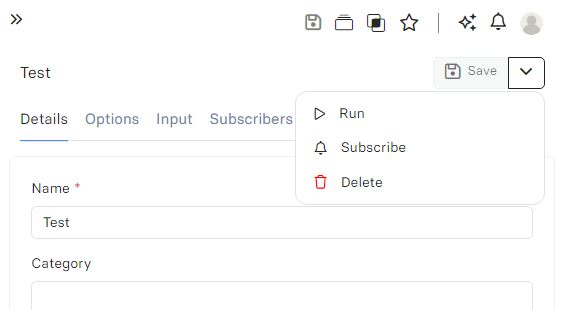
Sometimes your job can fail due to defined (or not) error handling, e.g. you have a task to fetch currencies from API endpoint and save it to the [Database](/solutions/databases), but your currency API endpoint is not reachable.
You can `Retry` this job **manually** in a platform or configure **automated** retry-mechanism.
## Retry Mechanism
Sometimes your job can fail due to defined (or not) error handling, e.g. you have a task to fetch currencies from API endpoint and save it to the [Database](/solutions/databases), but your currency API endpoint is not reachable.
You can `Retry` this job **manually** in a platform or configure **automated** retry-mechanism.
 ## Asynchronous Execution
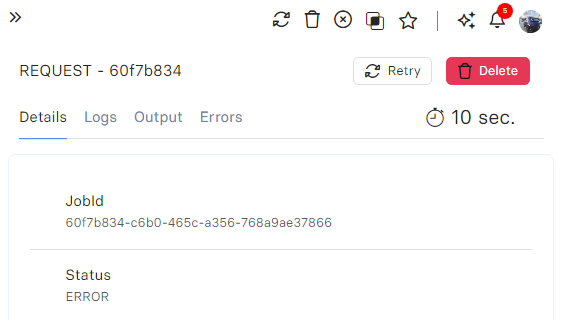
Jobs are configured to perform tasks asynchronously, they are distributed and ensuring efficient and timely operations.
Your [Components](/features/components) are executed and running in background.
## Scheduled Delivery
Configure your [Component](/features/components) trigger to execute a job up to 30 days in advance.
## Notifications
Users can subscribe to receive real-time updates on Job status changes, staying informed about their operational progress.
## Asynchronous Execution
Jobs are configured to perform tasks asynchronously, they are distributed and ensuring efficient and timely operations.
Your [Components](/features/components) are executed and running in background.
## Scheduled Delivery
Configure your [Component](/features/components) trigger to execute a job up to 30 days in advance.
## Notifications
Users can subscribe to receive real-time updates on Job status changes, staying informed about their operational progress.
 # Configuration
Besides the [common properties](/features/search) like `name`, `category`, `description`, you can configure these properties.
| Property | Required | Description |
| ------------------- | -------- | ----------------------------------------------------------------------------------------------------------------------------------- |
| `Component` | Yes | You can select [Component](/components) that will be executed upon request. |
| `Component Version` | No | You can select specific version of [Component](/components), default: `LATEST`. |
| `Trigger Account` | No | Select account that will be bound to execution context of a job (e.g. accessible with api.currentUser() method), default: `System`. |
# Input
Similar to [Endpoints Inputs](/run-api/configuration#input) you can configure some predefined flags.
| Property | Required | Description |
| ----------- | -------- | ------------------------------------------------------------------------------------------------- |
| `Skip Libs` | No | Whether the compiler should ignore [Component Libraries](/components/library) during compilation. |
### `excludeLibs`
You can configure the names of specific [Component Libraries](/components/library) that should **not be compiled** into execution.
This might be useful if you have libraries that are still work in progress or used sometimes, by default RevoEngine compiles all libraries into execution context.
If you have some libraries that are `Active` but they cannot compile (e.g. syntax error) you will get `Errors` of compiler (it should not affect execution if this library is not used, but warnings will come to your logs). Ideally they should be excluded with this option.
### `includeLibs`
You can configure the names of specific [Component Libraries](/components/library) that should **be compiled** into execution.
This might be useful if you have hundreds of libraries that won't be used in this execution context to improve the performance of Job execution.
# Configuration
Besides the [common properties](/features/search) like `name`, `category`, `description`, you can configure these properties.
| Property | Required | Description |
| ------------------- | -------- | ----------------------------------------------------------------------------------------------------------------------------------- |
| `Component` | Yes | You can select [Component](/components) that will be executed upon request. |
| `Component Version` | No | You can select specific version of [Component](/components), default: `LATEST`. |
| `Trigger Account` | No | Select account that will be bound to execution context of a job (e.g. accessible with api.currentUser() method), default: `System`. |
# Input
Similar to [Endpoints Inputs](/run-api/configuration#input) you can configure some predefined flags.
| Property | Required | Description |
| ----------- | -------- | ------------------------------------------------------------------------------------------------- |
| `Skip Libs` | No | Whether the compiler should ignore [Component Libraries](/components/library) during compilation. |
### `excludeLibs`
You can configure the names of specific [Component Libraries](/components/library) that should **not be compiled** into execution.
This might be useful if you have libraries that are still work in progress or used sometimes, by default RevoEngine compiles all libraries into execution context.
If you have some libraries that are `Active` but they cannot compile (e.g. syntax error) you will get `Errors` of compiler (it should not affect execution if this library is not used, but warnings will come to your logs). Ideally they should be excluded with this option.
### `includeLibs`
You can configure the names of specific [Component Libraries](/components/library) that should **be compiled** into execution.
This might be useful if you have hundreds of libraries that won't be used in this execution context to improve the performance of Job execution.