

These features require Platform 1.7.0 on the target instance. Publishing this documentation or updating the CLI does not upgrade the application.
Content-Type: text/event-stream.
SSE is a response mode of the same Endpoint. POST, request body, query, path
parameters, authorization, execution policy and guards continue to work.
Choose HTTP when the caller only needs the final response.
Configure the Endpoint
- Create a local JavaScript or TypeScript Component with a visible output element.
- Open the Endpoint and bind that Component.
- Under Options, choose Response mode → SSE.
- Select the output element, set a timeout and choose On disconnect.
- Keep the default
result,erroranddoneevent names for a simple client. - Validate and activate the Component/runtime and Endpoint before invoking the route.
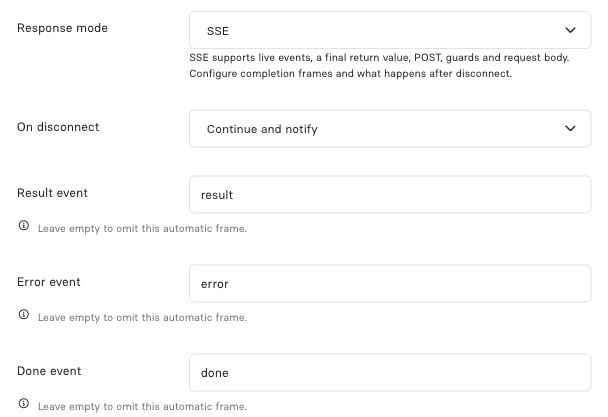
An SSE Endpoint retains the normal route and execution settings. Options adds disconnect policy and terminal event names.
Main:
200.
Emit events from code
Component · Main
popResult: "Main", the response ends like this:
return ends that element; subsequent elements still run.
The runtime selects popResult, or the full visible result map, after the whole
Component finishes. It then emits the configured result and completion frames.
noResult suppresses only the automatic result frame.
Await each emission to respect backpressure. Awaiting confirms the write boundary,
not that the client received or processed the event. Exact signatures are in the
generated SSE reference.
Completion, errors and custom protocols
The error payload contains
code, message and, when available, statusCode.
After streaming has started, the HTTP status cannot be changed; handle the error
frame and treat EOF without your terminal event as an incomplete attempt.
api.throw(...) is represented through the stream’s result/error semantics rather
than a new HTTP response after headers have been sent.
There is one SSE mode. Rename the three automatic terminal events to fit your client,
or set any name to null to disable it. Enabled names must be distinct and are
reserved: Component-authored events cannot reuse them.
To own a fully custom wire protocol, disable all three:
await sse.send('[DONE]'). Returning still finishes execution, but adds no disabled
automatic frames. Configure terminal names at the Endpoint boundary; do not add a
second protocol selector to your Component.
Choose a disconnect policy
Event IDs, retry and recovery
id is an application-owned string. An empty ID clears the cursor. retry is a
client reconnection hint in milliseconds; it does not retry server execution.
A fetch client implements reconnect itself and should honor its own retry policy.
Read the incoming cursor from api.input().headers['last-event-id']. Preserve that
header in your guard when using it. IDs alone do not persist events or make a Component resumable.
For recoverable work:
- Give the operation a stable run ID and bind it to an authorized owner and input.
- Atomically claim producer ownership before any model call or business mutation.
- Persist each event with a monotonically increasing sequence before sending it.
- Reconnect with the same run ID and last received event ID.
- Replay stored events after that cursor and return the stored final result.
Read a POST stream
Usefetch for a POST body or custom authorization headers. This minimal invocation
shows request setup; a client must also parse incremental SSE frames and handle its
terminal event.
Debug and inspect
In Studio, use full execution, a suitable timeout and the same disconnect policy as the Endpoint. The debugger shows emitted SSE events separately from logs and the final execution result. Its own transport envelope is separate from application frames. Stopping a continued preview may leave its execution running.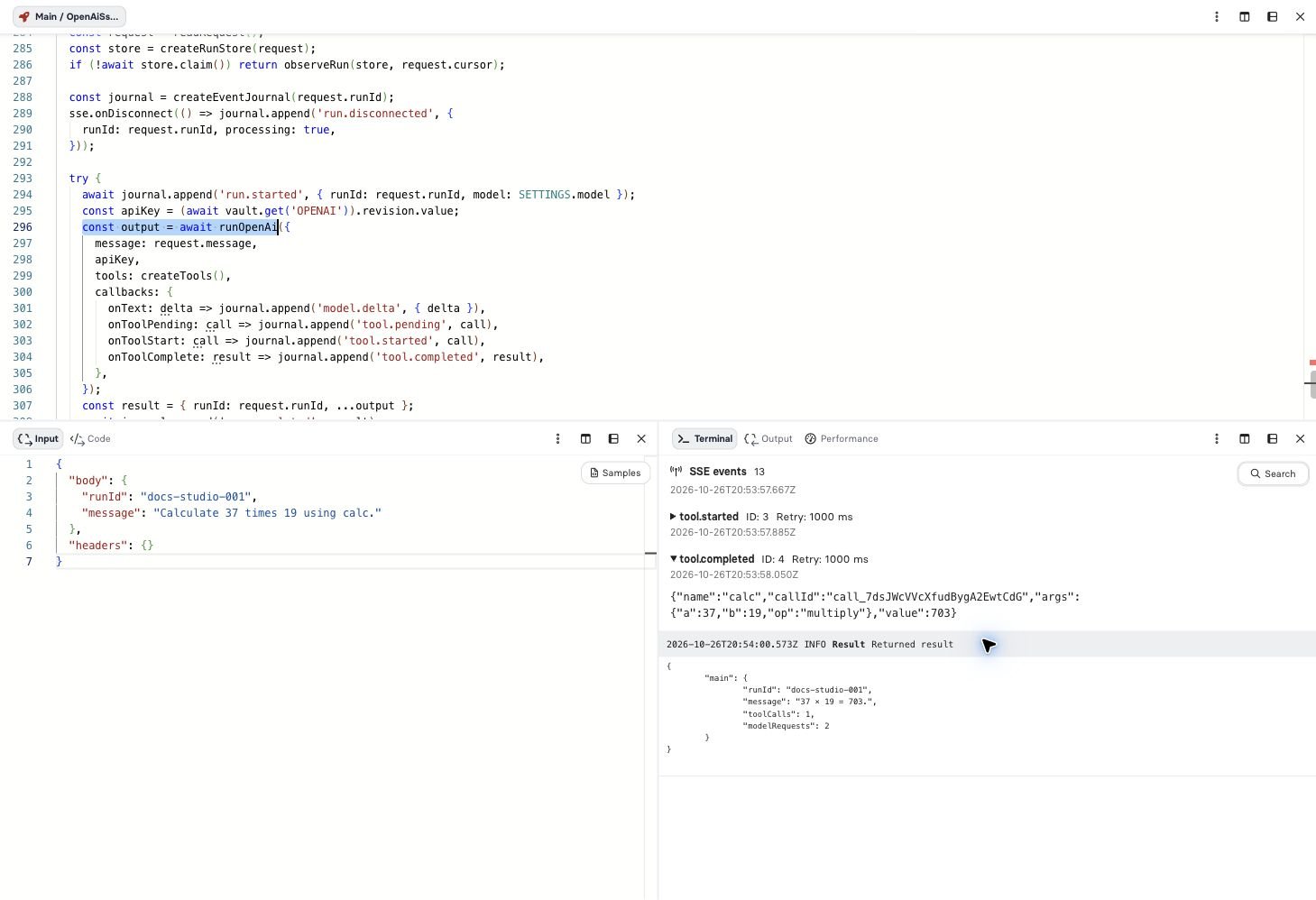
Studio separates application SSE frames from execution logs and final results.
result → done, disconnect behavior and cursor recovery.
The sample’s events deliberately use neutral data; never emit credentials, raw
provider errors or unrestricted inbound headers.