

These features require Platform 1.7.0 on the target instance. Publishing this documentation or updating the CLI does not upgrade the application.
calc, the Component executes it
and streams the final answer. Reconnecting with the same run ID observes the saved
operation instead of calling the model or calculator again.
The sample is a single JavaScript Component with no external package dependency.
The model loop accepts tool handlers and callbacks; persistence and SSE framing stay
outside that loop. It is a readable starting point for a production integration,
with the recovery boundaries below made explicit.
Every application event is persisted before it is sent, including text deltas and
notification of a detected disconnect. The sequence diagram condenses those writes.
Try the complete browser application
The HTML chat example includes the full client, incremental SSE parser and local streaming proxy, with no omitted helper functions. Download its ready-to-run archive, configure your own RevoEngine credential and point it at this Endpoint. The OpenAI key stays in the instance Secret.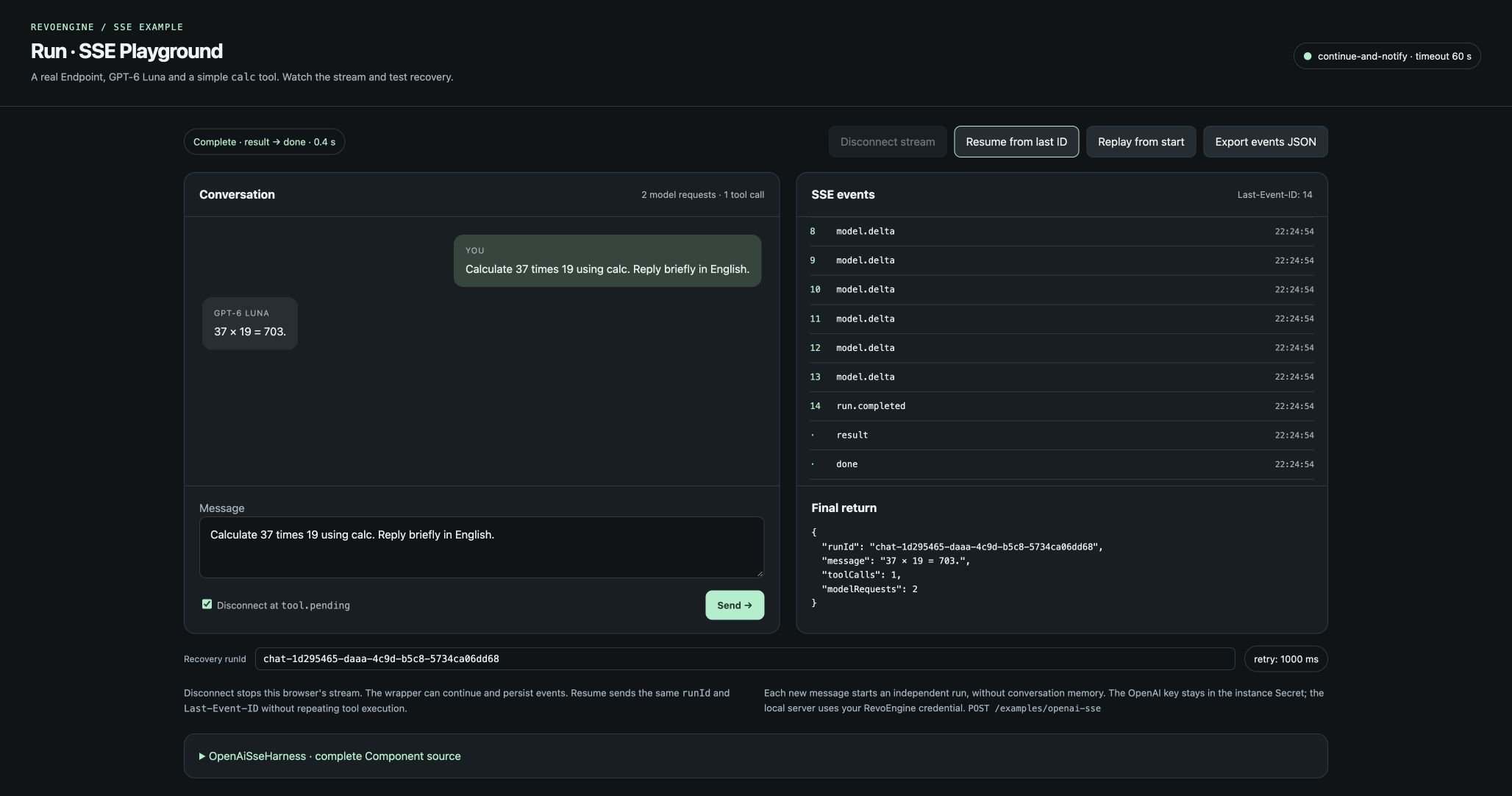
The documented Component behind the HTML chat: one calculation, streamed events, a final return and result/done completion.
Prepare the instance
1
Create the Secret
Create an enabled instance Secret named
OPENAI containing an OpenAI API key.
The Component reads it with vault.get('OPENAI'). Keep that key on the server.
The client authenticates to RevoEngine with its own credentials.2
Create the two Databases
Use the fields below and grant the execution account the necessary data access.
runId and eventId are unique primary keys. Keep these Databases private to
trusted application execution; the ownership check in the Component does not
replace Database ACLs.3
Save the Component
Create a JavaScript Component named
OpenAiSseHarness, with one visible element
named Main. Paste the complete source below. Save and activate its runtime
through the normal Studio workflow.4
Configure the Endpoint
Bind the Component to
POST /examples/openai-sse. Select SSE, output Main,
timeout 60 seconds and Continue and notify. Keep the default terminal names.
Use caller business identity for per-user run ownership. Select an execution
authority that can read the Secret and access the two Databases.Database fields
All fields except
final are required. The primary key eventId is constructed as
runId:sequence. Give production event history an appropriate retention policy.
Endpoint options and guard
Use the standard Endpoint configuration for the route, Component and execution authority. The relevant options are:parameters uses OpenAI JSON Schema; the Endpoint guard above uses
RevoEngine ValidatorSchema.
Read the orchestration first
The main flow keeps model callbacks separate from persistence:Callback wiring · excerpt
createTools() maps each public function definition to an asynchronous execute
handler. To add another tool, add a registry entry with its schema and handler;
the model loop and SSE callbacks do not need another name-specific branch.
Validate arguments again in the handler, even with a strict tool schema. Put
resource authorization and idempotency inside a handler that performs business
mutations. Never use eval to implement a calculator or dispatch a tool by arbitrary
user-supplied code.
The sample uses OpenAI Responses function calling
and the public gpt-6-luna model
with reasoning disabled. It preserves the model output alongside each
function_call_output, awaits callbacks, limits model/tool calls, caps output tokens
and closes every opened upstream stream in finally. It does not retry an upstream
request automatically.
Complete Component source
Download the Component body as plain text, or copy it below intoMain. This is an element body; it has no imports or module exports.
Component · Main
Invoke and inspect the stream
Use a new run ID for each new message:
The model decides whether a tool is needed. Arithmetic prompts normally produce a
calculation; a greeting may produce text without a tool call. Text, delta count and
number of model requests can vary. For
37 × 19, inspect that the actual tool value
is 703, rather than matching the exact wording of the answer.
Example final return
run.completed is an application event stored in the journal. result and done
are automatic transport frames. Returning the final result does not manually emit
those reserved names.
Disconnect and recover
The Endpoint usescontinue-and-notify. The producer registers one callback that
appends run.disconnected to the same serialized journal as the main flow. Further
socket writes are discarded after disconnect, while database writes and model/tool
work can continue within the original 60-second deadline.
Stop the first client after tool.pending. Reconnect using the same run ID and the
last event ID you actually processed:
2 is an example cursor; use the ID received from your own stream. The header takes
precedence over optional body.after. The observer verifies the stored owner before
reading any events, drains them in ascending sequence and returns the saved result.
A completed reread after the final cursor returns that result with no repeated model
or tool execution. To replay the full journal, use cursor 0.
This is application recovery, not automatic SSE replay. Producer ownership is
claimed before contacting OpenAI, and the stored run remains authoritative after
the claim’s retention expires. Never delete an incomplete run and retry its
mutations without first reconciling their outcome.
Debug in Studio
Select the Component as the debugger target, switch from restricted mode to Full execution, set a 60-second timeout and choose Continue and notify. Restricted mode rejects the idempotency claim and persistence writes; it cannot run this producer. The debugger input wraps the client body in the normal request context:message if desired and set
headers["last-event-id"] to the cursor string. Inspect SSE events separately
from logs and the final result.
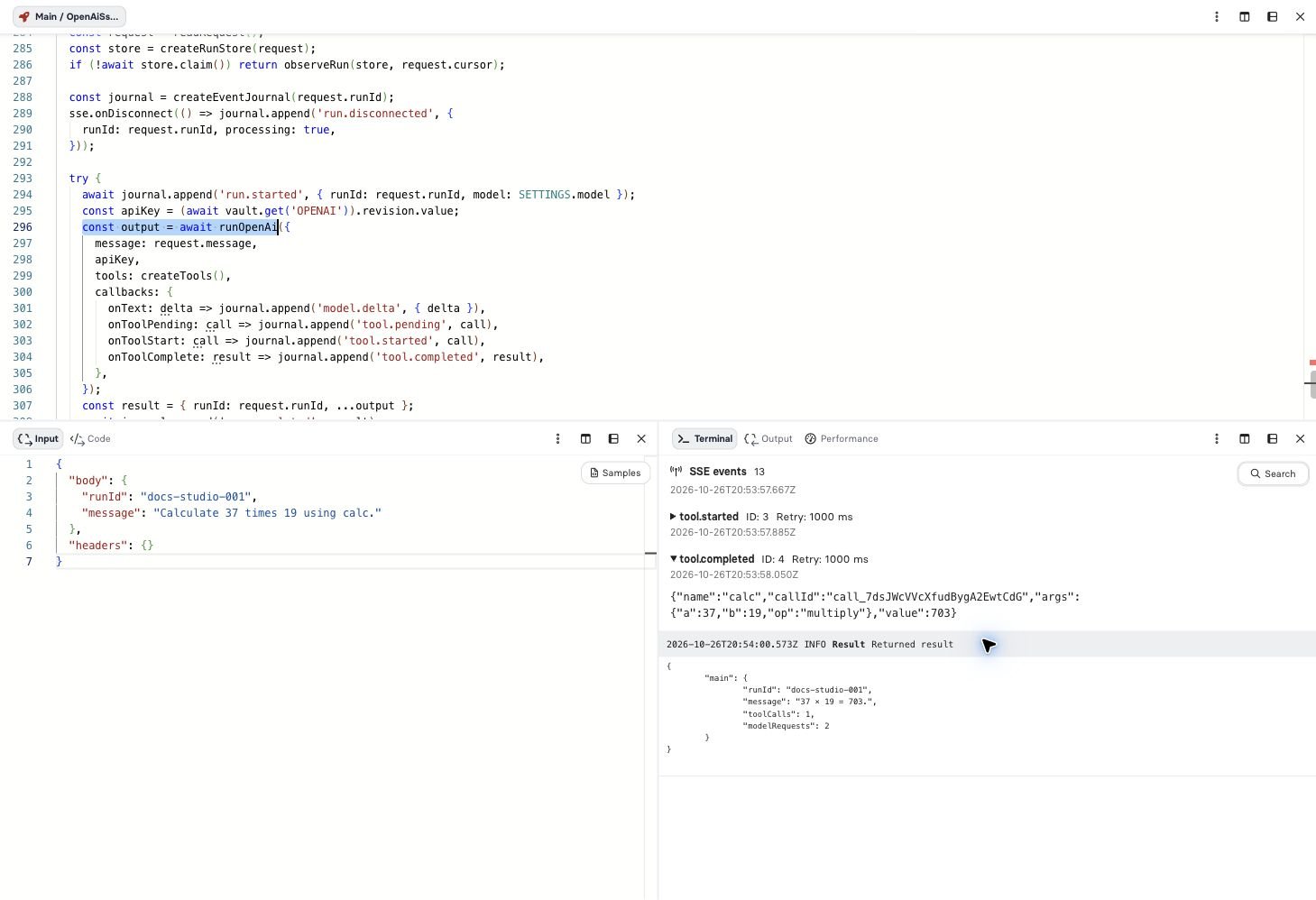
The sample running in Studio: emitted events and final results are separate debugger views.
Boundaries to keep in a production integration
- Transient work: process loss or a hard timeout can leave a run marked
running. A reconnect observes it; it cannot restart lost execution memory. Add a durable Job or explicit reconciliation when that work must finish reliably. - Idempotency: the producer claim prevents duplicate starts through this sample path. It does not make an arbitrary external tool side effect exactly once across a crash. Give each mutating tool a provider-supported idempotency key and durable outcome tracking.
- Privacy: the Component suppresses raw provider errors and never persists its
API key. The journal deliberately stores the prompt, tool arguments, results and
generated text. Apply access controls, redaction and retention to that data.
hideRequestandhideResponseaffect execution history, not these explicit writes. - Resource limits: observers use bounded pages but poll for pending work. Align concurrent observers, event retention and run duration with instance capacity. For a larger deployment, batch adjacent text deltas before persisting each event.
- Conversation: each run is one user message and its tool loop. Add authorized conversation state explicitly if you need multi-turn chat; do not trust a caller’s arbitrary history as privileged instructions.
- Notification:
onDisconnectis best effort and shares the execution deadline. The main flow and callback may overlap; the journal orders writes. A disconnect notification can arrive late, and is not a durable business finalizer.