

Define the two actions
Create a TypeScript Component named
SalesTools. The plugin supplies its entrypoint and arguments in api.input().agentTool. The same Component can back a separate Endpoint, where input arrives in body.
SalesTools · Main
Configure the Component tools plugin
In AI Agents → Plugins, create a Component tools plugin named Asterion Sales Desk. SelectSalesTools and add the two tools from the table. Give each a concrete description so the model can distinguish availability from price calculation.
Use this input schema for asterion_quote_contract:
sku. Do not accept a discount, final amount or arbitrary buyer identifier. Keep the result bounded to the product, balances, contract calculation and execution identifier.
Declare these operations as read-only, with no external side effects, and choose a bounded timeout and output limit. Approval metadata must reflect the implementation; it cannot turn a writing Component into a read-only tool. The execution identity still needs permission to read the selected resources and execute the Component.
Test the plugin definition and inspect the selected active Component revision. A successful configuration test is not proof that the AI executed the business tool. Verify an actual Assistant call next. See plugin lifecycle for synchronization and drift review.
Use it from an Assistant
Attach the plugin to a new thread and ask:1250 minor units and discount of 750 basis points, expect totalMinor: 4625 and reserved: false. Inspect the tool result as well as the final answer. “Tool completed” means the call completed; business verification still depends on its returned data.
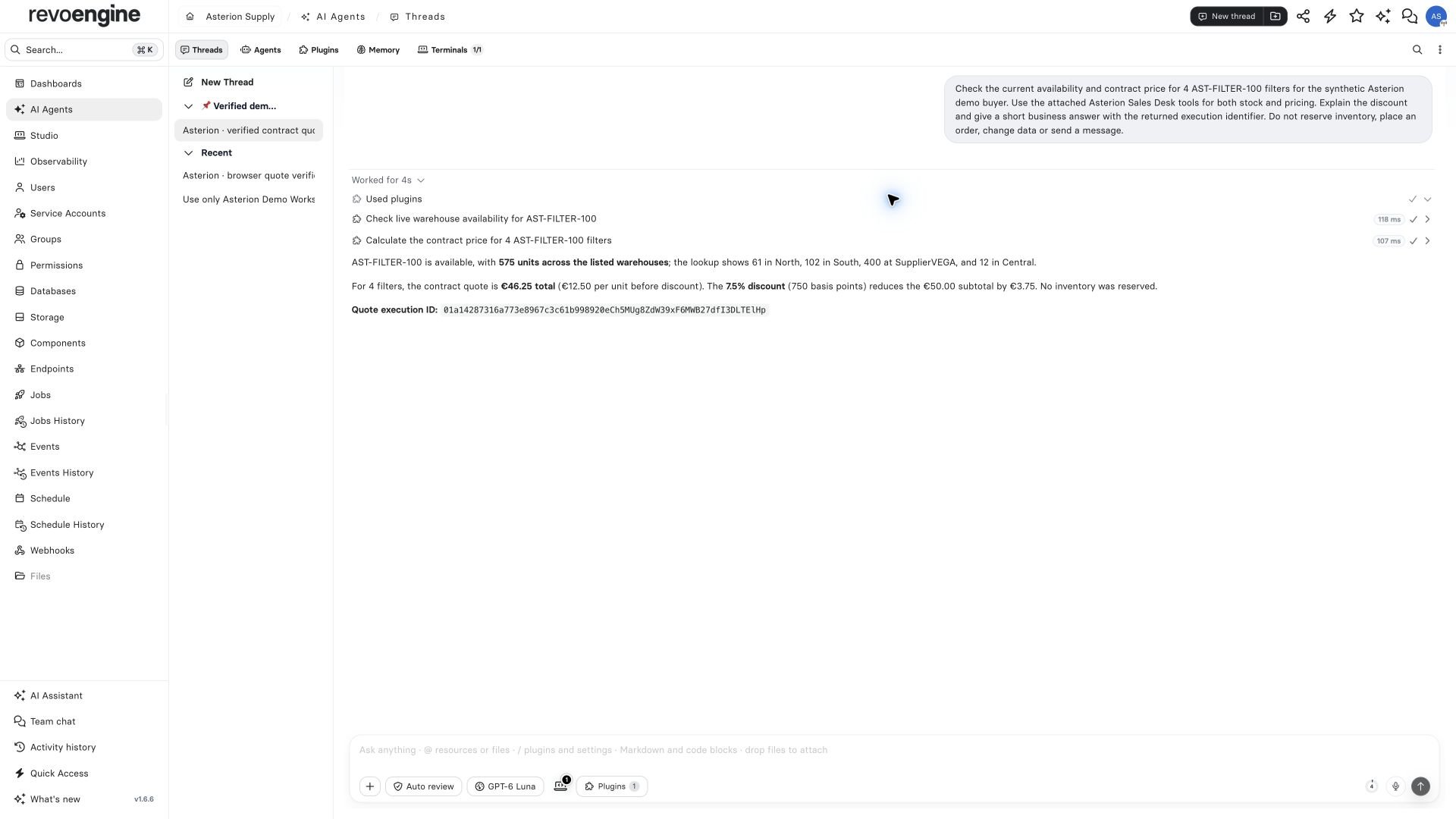
A real Assistant consultation in Asterion. Both business-tool calls completed, and the answer gives the verified contract price without reserving stock.
pluginIds attaches the plugin. If you restrict toolNames, admit the built-in dispatch tools plugin_load and plugin_call. Custom aliases such as asterion_quote_contract identify plugin operations; they are not replacements for those built-in dispatch tool names.
Use the same plugin from an Agent
On an instance with Autonomous Agent preview enabled, attach the plugin in the Agent’s Plugins configuration. Use a dedicated service account with the necessary resource access. Select initial loading separately from attachment when the UI offers it. Give the Agent a bounded task: verify one quote, retain the returned execution identifiers in its workspace, and report whether it verified the saved receipt. Inspect the run’s conversation, tool activity and artifact independently. An Agent may finish after reporting a limitation;FINISHED alone does not establish that every requested verification passed.
The local Asterion run called both plugin actions, calculated 46.25 EUR and created a JSON receipt. Its file-emulator readback failed; a separate authorized download verified the receipt. This is a useful operational distinction to retain rather than hiding it behind the run status.
Continue with the customer portal integration, Agent operations and the operations dashboard.